
A technician is troubleshooting a PC that is unable to perform DNS lookups. Utilizing the following firewall output: Protocol/Port Action Directionn1 Allow Outn445 Block Outn53 Block Outn123 Block Outn80 Block Out. Which of the following ports should be opened to allow for DNS recursion?
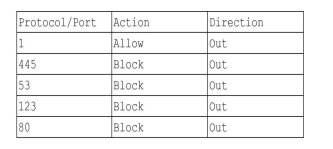
Port 53 should be opened to allow for DNS recursion.
Port 53 is the designated port for DNS (Domain Name System) services, enabling the resolution of domain names into IP addresses. Since the output indicates that port 53 is currently blocked, it must be opened to restore the ability to perform DNS lookups.
Port 1 is not associated with any standard networking protocols and is generally not used for DNS operations. It is often reserved for specific applications or services, but it does not play a role in DNS recursion, making it irrelevant to this troubleshooting scenario.
Port 53 is the correct choice as it is specifically designated for DNS services. In order to allow DNS queries and responses, this port must be open. The firewall output indicates that port 53 is blocked, preventing DNS lookups from being performed.
Port 80 is used for HTTP traffic, primarily for web browsing. While it is essential for accessing web content, it does not facilitate DNS operations. Opening port 80 will not address issues related to DNS queries or recursion.
Port 123 is utilized for the Network Time Protocol (NTP), which is unrelated to DNS functionality. While important for time synchronization across networks, it does not affect the ability to perform DNS lookups or recursion.
Port 445 is associated with Microsoft’s SMB (Server Message Block) protocol used for file sharing and other services. It has no relevance to DNS operations, and opening this port will not resolve issues related to DNS lookups.
To enable DNS recursion and allow the PC to perform DNS lookups, port 53 must be opened, as it is the designated port for DNS services. The other ports listed—1, 80, 123, and 445—serve different protocols and do not contribute to DNS functionality. Hence, addressing the block on port 53 is essential for resolving the network issue at hand.
Related Questions
View allA customer tells a technician about internet issues related to a modem...
A technician needs to configure a new computer to automatically receiv...
A technician is assigned to offboard a user. Which of the following ar...
A technician found that an employee is mining cryptocurrency on a work...
A user receives a notification indicating the antivirus protection on...
Related Quizzes
View allCompTIA A Plus Certification Exam
CompTIA A Plus Exam Questions
CompTIA A Plus Practice Exam
CompTIA CySA+ Cybersecurity Analyst Certification all in One Exam Guide
CompTIA Network Plus Certification Exam Quiz
CompTIA Security Plus Exam Answers
Free CompTIA Security Plus Practice Test
CompTIA Security Plus Simulation Questions
CompTIA Security Plus 501 Practice Questions
CompTIA Security Plus Example Questions
- ✓ 500+ Practice Questions
- ✓ Detailed Explanations
- ✓ Progress Analytics
- ✓ Exam Simulations